

Who connects: Administrator, Company Manager, Area Manager, and Unit Manager. Available on all plans; Tino and Campaigns on Instagram require the Scale plan.The Tartini interface is in Portuguese. Screen and button names appear here exactly as on screen, with the translation in parentheses.
Prepare the Instagram account
Tartini connects through Instagram’s official API. Before going to Tartini, check two things on the account:- The account is professional. Business or Creator. In the Instagram app, you change it in Settings > Account type. You don’t need a Facebook Page.
- Message access is allowed. The Allow access to messages option must be on, or Direct messages won’t reach Tartini.
Connect the account to Tartini
By default, no Unit has an Instagram channel. Each Unit can have one. Where to find it: Configurações > Canais > Instagram (Settings > Channels > Instagram).1
Start the connection
In the Atenda o Direct do Instagram no mesmo Inbox (Handle Instagram Direct in the same Inbox) box, at the top of the screen, click Conectar Instagram (Connect Instagram).
2
Fill in the channel details
Choose the Entidade (Entity) and enter a Nome do canal (Channel name) that helps your team identify it later.
3
Log in to Instagram
Click Conectar com Instagram (Connect with Instagram). The Instagram login screen opens in the same tab: log in with the Unit’s professional account and authorize Tartini.
4
Check the account
Back in Tartini, the Instagram conectado (Instagram connected) screen shows Conectado como (Connected as) and the account’s @. Click Ir para o canal (Go to channel).
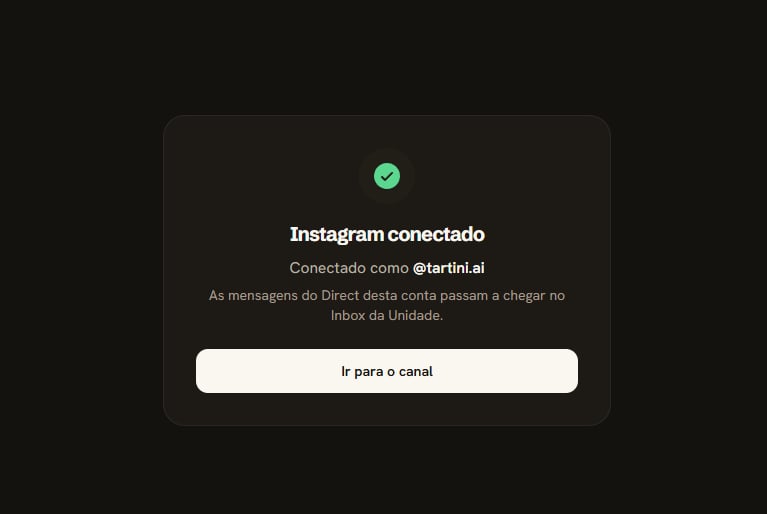
The Conectado como line and the Ir para o canal button
If the login fails or is canceled, the Não foi possível conectar (Couldn’t connect) screen explains why. Click Tentar de novo (Try again) to go back to the channels screen.
Know what arrives in the Inbox
Instagram conversations arrive in the Inbox like those from other channels. These come in:- Text, photo, video, audio, and file.
- Reactions and button clicks.
- Story replies and mentions, shared posts and reels. They come in as the media, with a label such as “Respondeu ao seu story” (Replied to your story).
- Messages the person deleted, which show as deleted.
How the contact shows up
The contact arrives with name, photo, and @, which links to their Instagram profile. When the person follows your account, the contact record shows Segue sua empresa (Follows your company).Meta only shares the name and photo of people who have already written to your account. The phone number doesn’t show, because Instagram doesn’t provide it.
The phone number request at closing
When the conversation is closed, if the contact has no phone number and their last message was less than 24 hours ago, Tartini asks whether the person wants to share their number and explains why. Instagram shows a button with the person’s own number. If they tap it, the phone number shows up in the contact details. The request goes out only once per contact. Outside the 24-hour window, it waits for the next closing.Message status
“Seen” works: when the person reads it, the message shows as read. Instagram doesn’t confirm delivery, so the message goes straight from sent to read.Reply on Instagram
Your team replies from the Inbox, as on the other channels. Instagram has a few differences:- Plain text. Instagram has no bold or italics, and the agent’s name in the signature goes without bold.
- Long texts in parts. Above 1,000 characters, the text is split into more than one message.
- Attachments. Photo, video, audio, and PDF go as attachments; other files go as a link. The caption arrives in a message right after the attachment.
- Reactions. Only ❤️ is guaranteed.
- No deleting, editing, or templates. Tartini can’t delete or edit a sent message, and the channel has no templates.
Replies sent from the Instagram app or from Meta Business Suite enter the history as team replies. They don’t trigger Tino.
Respect the reply deadline
On Instagram, the person always starts the conversation. Your account can’t reach someone who has never written to it, and there is a reply deadline, counted from the contact’s last message:
The Inbox shows the deadline above the message field:
- Up to 24 hours: Responda em até (Reply within) and the time left.
- From 24 hours to 7 days: Passaram 24h: só a equipe pode responder (24h have passed: only the team can reply), with the time limit.
- After 7 days: the field is locked with O prazo do Instagram acabou. Aguarde o contato escrever de novo. (The Instagram deadline is over. Wait for the contact to write again.)
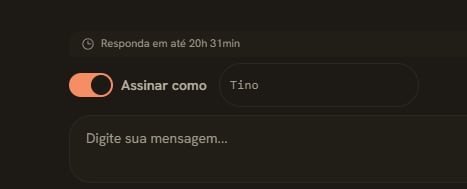
The notice with the time left to reply
The rule is Meta’s and applies to any tool connected to Instagram.
Turn Tino on for Instagram
With the channel connected, the Instagram screen shows the shortcut to AI per channel. Turn Tino on and set up hours, follow-up, and closing, as on the other channels.Available from the Scale plan. See the details in Turn Tino on in a channel.
The notice that the service is automatic
On Instagram, Meta requires automatic service to say it is automatic. That’s why the Aviso de atendimento automatizado (Automated service notice) block is always on for this channel: you edit the text, but you can’t turn it off. Where to find it: Configurações > Atendimento > IA por canal (Settings > Service > AI per channel), on the Instagram channel. The default text is: “Olá! Sou o assistente virtual da{empresa}. Se preferir falar com uma pessoa da equipe, é só pedir.” (Hi! I’m the virtual assistant of {empresa}. If you’d rather talk to someone on the team, just ask.) {empresa} becomes your company’s name.
Tino sends the notice at three moments:
- In the first reply of the conversation.
- When the conversation comes back to it from the team.
- After 24 hours without it speaking in the conversation.
The satisfaction survey
On Instagram, the satisfaction survey arrives with buttons from 1 to 5. It only goes out within the first 24 hours of the deadline.Set up ready-made questions and the menu
Ready-made questions and the persistent menu give the person a quick way to start or continue the conversation without typing. Where to find it: Configurações > Canais > Instagram (Settings > Channels > Instagram), in the channel, section Perguntas prontas e menu (Ready-made questions and menu).- Ready-made questions: up to 4, with up to 80 characters each. They show to people who open a conversation with your account for the first time, only in the Instagram phone app.
- Persistent menu: up to 5 items, each with a title of up to 30 characters and, optionally, a link starting with
https://.
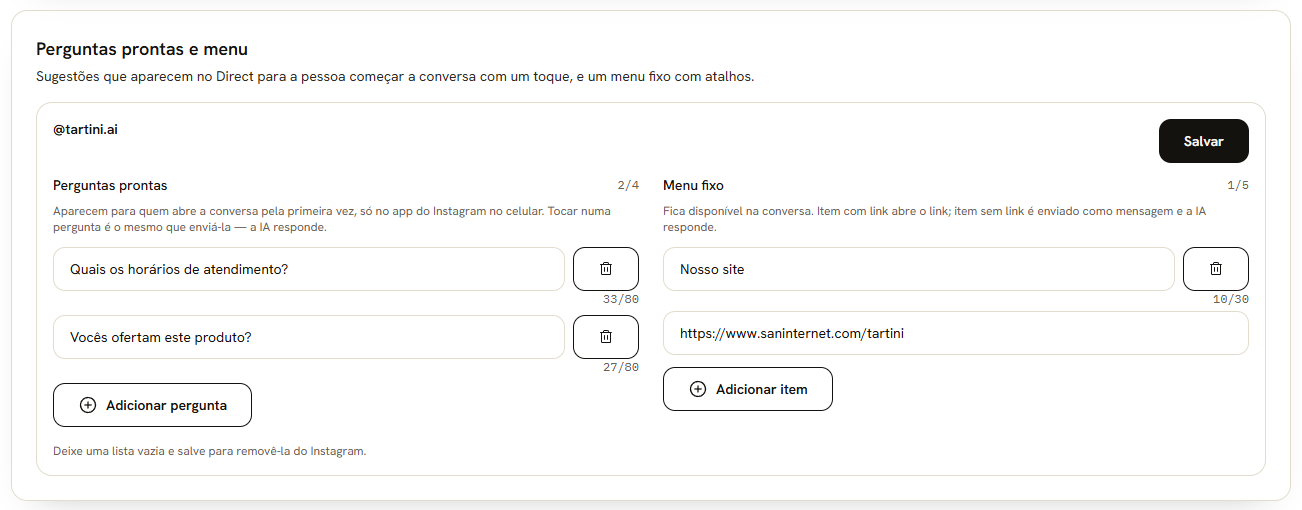
The question fields and the menu items with a link
Find out where the person came from
Tartini records the origin when the person arrives through a Meta ad that leads to Direct, or replies to a message from a comment trigger:- The conversation in the Inbox shows the Veio de anúncio (Came from an ad) tag, or that the person came from a comment, with the rule name.
- The contact record has the Origem (Origin) section, with the history.
- Tino receives this information to understand what brought the person.
Meta reports the ad origin only once, when the person arrives through that ad.
Reply to comments with a Direct message
With comment triggers, whoever comments a keyword on a post or reel from your account gets a private message in Direct. If the person replies, the conversation enters the Inbox and Tino answers.The feature depends on Meta approving the comments permission and is only available after that. Channels connected before the feature is enabled must be reconnected once to grant this permission; the screen shows a notice when that is needed.
1
Name the rule
The name helps the team recognize the rule and shows as the conversation’s origin in the Inbox.
2
Choose the post
Pick a post or reel from the account’s most recent ones, or Qualquer post (Any post).
3
Set the keywords
From 1 to 10 words or phrases. The rule matches whole words, ignoring upper and lower case and accents.
4
Write the private message
This is the text that reaches the Direct of whoever commented.
5
Optionally, reply to the comment in public
A short reply on the comment itself, such as “I sent you a DM”. It is optional.
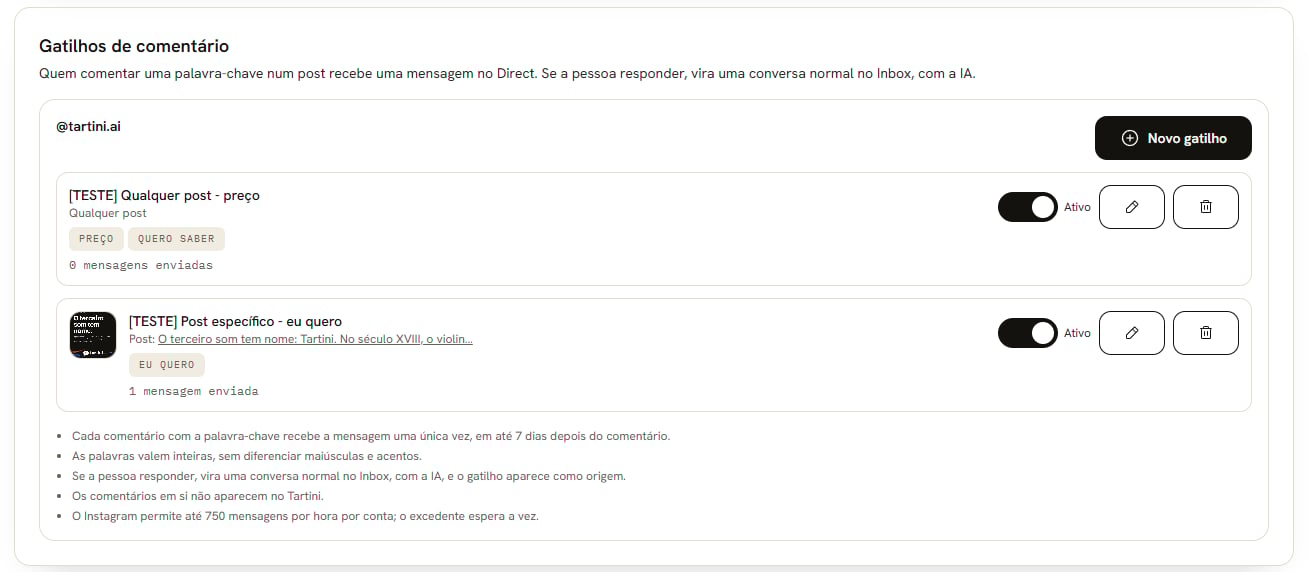
The chosen post, the keywords, and the total private messages sent
Meta’s rules
- One private message per comment.
- The message only goes out up to 7 days after the comment.
- The conversation only continues if the person replies.
- Up to 750 private messages per hour per account. Above that, messages wait their turn.
When the person replies
The reply becomes a regular conversation in the Inbox, and Tino answers if AI is on for the channel. The conversation shows as its origin that the person came from a comment, with the rule name. The same origin appears in the Origem (Origin) section of the contact record, and Tino knows the person arrived through a comment.The comments themselves do not enter the Inbox or any other Tartini screen. Comments on lives do not trigger the rules.
Campaigns on Instagram
An Instagram campaign only reaches people who have already talked to your account on Instagram and wrote in the last 24 hours. The campaign uses no template and never the team’s 7-day window.Campaigns require the Scale plan. See the rules and the Audiência (Audience) tab in Create a campaign.
Fix channel issues
In the list of connected accounts, the sem receber (not receiving) badge shows next to the channel when messages aren’t reaching Tartini.The channel got disconnected
Cause: the Instagram connection expires in 60 days, but Tartini renews it on its own. The channel only drops if someone removes Tartini from the account’s connected tools, or if the connection fails. When that happens, the Unit receives an email warning. Fix: click the ⋮ next to the channel and choose Reconectar (Reconnect). Log in with the same account: the history and contacts belong to it, and a different account is refused.Another app is the account’s main app
Cause: the account has another app as the main one for messages, such as Instagram’s own Inbox, Meta Business Suite, or another tool. So Tartini doesn’t receive the messages. The Instagram screen shows a yellow warning: outro app é o principal desta conta do Instagram, e o Tartini não está recebendo as mensagens. (another app is the main one for this Instagram account, and Tartini isn’t receiving the messages.) Fix: set Tartini as the account’s main app. The warning shows the path:- In the Instagram app: Settings > Messages and story replies > Message controls > Connected tools.
- In Meta Business Suite: Settings > Inbox > Connected apps.
Meta isn’t delivering the messages
Cause: Meta stopped delivering the account’s messages to Tartini. Tartini checks this every day and resubscribes on its own; the warning shows up when it can’t. The Instagram screen shows a red warning: a Meta não está entregando as mensagens desta conta ao Tartini. (Meta isn’t delivering this account’s messages to Tartini.) Fix: click Reconectar (Reconnect) in the warning itself and log in with the same account. The history stays.Frequently asked questions
Does Instagram show the contact's phone number?
Does Instagram show the contact's phone number?
Only if the person shares it. The request with the button reaches them once, when the conversation is closed within the 24 hours.
Can I send the first message to someone on Instagram?
Can I send the first message to someone on Instagram?
No. The person always starts, with a Direct message, a story reply, or a mention. After that, the team and Tino reply within the deadline.
Do I need a Facebook Page?
Do I need a Facebook Page?
No. The Instagram account just needs to be professional, Business or Creator.
Can I connect a different account in place of the current one?
Can I connect a different account in place of the current one?
Not by reconnecting: it only accepts the same account, because the history and contacts belong to it. For a different account, use another Unit.
Why doesn't the message show as delivered?
Why doesn't the message show as delivered?
Instagram doesn’t confirm delivery. The message stays as sent and becomes read when the person sees it.
Why did Tino stop replying in a conversation?
Why did Tino stop replying in a conversation?
24 hours have passed since the contact’s last message. Up to 7 days, only the team replies; after that, only when the contact writes again.